Design Your First Game Idea
Turn one safe creative idea into a tiny game plan with a character, a goal, and a rule.
By the end, your child will have a Game Idea Card — not code, not an account, not a public post.
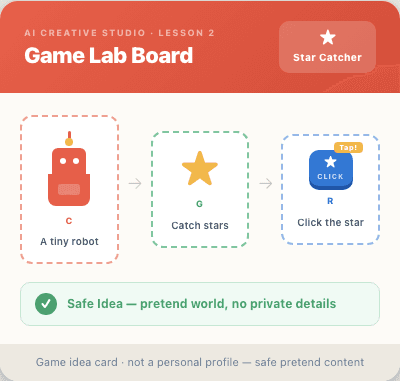
From creative idea to game idea.
In Lesson 1, your child learned to share safe creative ideas with a parent-approved AI assistant. In Lesson 2, they turn one of those ideas into a simple game plan.
Game Idea Card.
Your child will make a safe, fictional game plan using character, goal, rule, and simple feedback. No coding, no account, no upload required.
Your lesson path.
This preview stays focused on planning. Coding begins later in the Starter Pack.
You are a game designer today.
Today, you are a game designer. Your mission is to turn one idea into a tiny game plan.
Structured thinking before building.
This preview still does not require coding. The goal is structured planning before building.
Younger learners may need help reading instructions or copying prompts. No coding knowledge is needed.
A game idea can start small.
No game engine theory today. Just three simple parts every game plan needs.
Character
Who does the player help or control?
Goal
What are they trying to collect, find, avoid, or finish?
Rule
What happens when the player clicks, moves, catches, or misses?
Use pretend worlds, not private details.
Game ideas work best with fictional characters and made-up worlds. Private details do not belong in any game idea.
- ✓a cat catches stars
- ✓a robot finds batteries
- ✓a dragon collects crystals
- ✓a helper creature packs a school bag
Copy-ready prompts.
Use one of these with a parent-approved AI assistant. Keep ideas fictional or general.
Your Game Idea Card.
Fill your card with fictional or general game ideas only. Leave out private details.
This is a static concept card. Fill it on paper, or use it as a reference when working with a parent-approved AI assistant.
Make it yours.
Change one part at a time so the game stays simple enough to build later.
Change the character
Try a cat, robot, dragon, cloud, turtle, or helper creature.
Change the goal
Collect, find, sort, rescue, match, or reach something.
Change the rule
Pick one simple action that makes the game respond.
If AI makes it too complicated.
Game ideas can grow too fast. Keep the first version tiny.
Show your card to a parent.
Explain the character, goal, and rule. Use your Game Idea Card as a guide.
- →My character is...
- →The goal is...
- →The rule is...
- →This idea is safe because...
What this preview proves.
Your child practiced structured thinking before coding. They created a visible Game Idea Card, used safe AI brainstorming, and kept the game fictional or general.
This preview helps you see whether your child enjoys project-based AI learning before buying the Starter Pack. Self-paced — no live grading or tutoring.
- ✓Child practiced structured thinking before coding
- ✓Visible output: Game Idea Card
- ✓No coding, account, upload, or public posting used
- ✓No personal information collected
Parent summary.
A quick view of what happened in this preview lesson.
What your child practiced
Breaking an idea into character, goal, rule, and simple feedback.
Why this matters before coding
A small plan makes the later game easier to build and troubleshoot.
What this preview shows
The course turns imagination into structured projects, not just AI chat.
What comes next
Lesson 3 turns this Game Idea Card into a simple browser game in the Starter Pack.
Ready to build the game?
In Lesson 3, your child turns this Game Idea Card into a simple local browser game.
No coding experience needed. Parent-guided. No account, upload, or public posting required.