AI Is My Creative Partner
Learn how AI can help brainstorm and draft ideas — while your child stays the creator who chooses, checks, and improves.
By the end, your child will have a safe creative card — not a personal profile.
Your lesson path.
This preview keeps the first AI experience small, visible, and parent-guided.
Join the AI Creative Studio.
Today, you are the creator. AI is your helper. Your mission is to make your first AI Creator Card.
Short and low-pressure.
This preview lesson is designed to be short and low-pressure. The goal is a safe first win, not technical mastery.
Younger learners may need help reading instructions, copying prompts, or filling the card. No coding knowledge is needed.
AI helps. You choose.
No machine learning theory today. Just one simple idea: AI can help, but the child stays in charge.
AI is a creative helper, not magic.
It can suggest ideas, but it does not know everything.
You stay the creator.
Your ideas, choices, and edits make the project yours.
AI gives ideas. You choose, check, and improve.
If an answer is too long, too hard, or not right, ask for a better version.
Share ideas, not private details.
This is the most important rule. Children should only share safe, creative ideas — never personal information.
- ✓a game about a robot helper
- ✓a story about a cloud city
- ✓a card for a pretend invention
- ✓a checklist for a school bag
Copy-ready prompts.
Use one of these with a parent-approved AI assistant. No private information is needed.
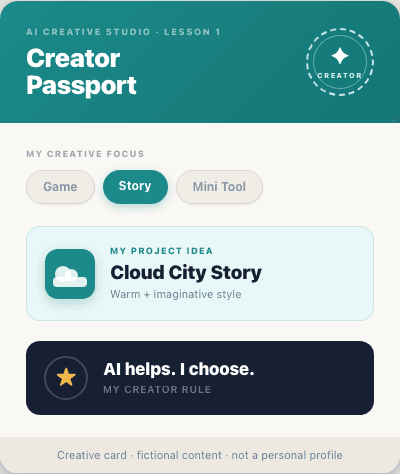
Your AI Creator Card.
Fill your card with creative preferences and project ideas. Leave out private details.
This is a static concept card. Fill it on paper, or use it as a reference when working with a parent-approved AI assistant.
If AI gets it wrong.
AI answers can be too long, too hard, or too nosy. Kids can always ask for a safer, simpler version.
Pick a direction for your idea.
Choose one safe direction for your idea. Keep it small enough to finish a first version.
Make it a game idea
Pick a player, a goal, and one simple rule.
Make it a story idea
Pick a character, a place, and one choice.
Make it a useful mini tool idea
Pick one small school or practice task it can help with.
Show your card to a parent.
Explain what you want AI to help with and what private details you will not share.
- →My project idea is...
- →AI can help me with...
- →I will choose, check, and improve...
- →I will not share private details...
What this preview proves.
Your child practiced explaining an idea safely, used safe AI boundaries, and kept creative control. No coding background is needed.
This is self-paced and does not include live grading, private tutoring, or homework submission.
- ✓No child account, upload, or public posting used
- ✓No personal information collected
- ✓AI was a helper — child stayed the creator
- ✓Visible output: AI Creator Card
Parent summary.
A quick view of what happened in this preview lesson.
What your child practiced
Explaining a simple idea, using safe prompt language, and checking AI suggestions.
What this preview shows
The course is project-based, structured, self-paced, and not a generic chatbot tutorial.
What comes next
Free Lesson 2 turns a creative idea into a simple Game Idea Card. No coding required.
Ready for the next free preview?
Try both free preview lessons before deciding whether the Starter Pack fits your family.
Lesson 2 turns one safe creative idea into a simple Game Idea Card.